EST. 1995 Classic Windows archiver
Baixar WinRAR: pack, protect and unpack files on Windows
Baixar WinRAR for Windows 11 and 10 to easily open, compress, and extract RAR, ZIP, and other archive files. Download the latest WinRAR free trial for fast, reliable file management, easy sharing, and secure archiving on your PC in just a few clicks.
- Latest stable
- 7.23 · Jun 2026
- Platform
- Windows 64-bit
- Licence
- 40-day trial
- Creates
- RAR & ZIP
01 What is WinRAR
A 1990s utility that still does one job very well
WinRAR is a file archiver for Windows. It squeezes files and folders into one smaller archive, and opens the archives other people send you. The RAR format behind it was created by Eugene Roshal in 1993. WinRAR, its Windows program, was first released on 22 April 1995, a few months before Windows 95.
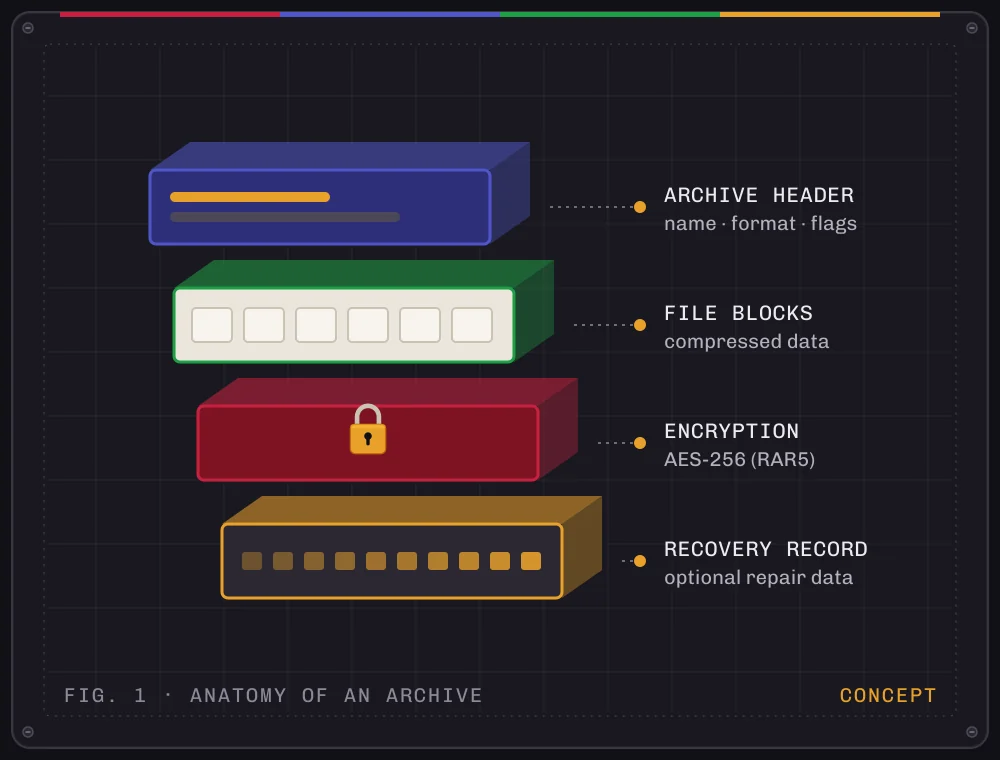
Three decades later, WinRAR is developed by Eugene and Alexander Roshal under the RARLAB name and published by win.rar GmbH in Berlin. It creates RAR and ZIP archives and extracts more than a dozen other formats. It also handles the jobs that keep it popular: AES-256 encryption, recovery data for damaged archives, and splitting large files into parts.
The format has changed with the hardware. RAR5 arrived with WinRAR 5.0. WinRAR 7 (2024) raised the maximum compression dictionary to 64 GB on 64-bit systems with enough memory. Since 7.10, new versions are 64-bit only.
- 1993RAR format created
- 1995First WinRAR release
- 5.0RAR5 format introduced
- 2024WinRAR 7: 64 GB dictionary
- 20267.23, current stable
02 Features
The toolkit, one function at a time
WinRAR's window hasn't changed much over the years, and that's part of the appeal. These are the tools people actually use, with honest notes on what each one does.
-
Compress to RAR or ZIP
Right-click › Add to archive. RAR usually compresses better; ZIP opens everywhere.
-
Extract many formats
Opens RAR and ZIP plus 7Z, TAR, GZ, BZ2, XZ, ISO, CAB, ARJ, LZH, ZST and more.
-
AES-256 encryption
Password-protect RAR5 archives, and optionally hide the file names too.
-
Recovery record & repair
Add repair data when you create an archive, then fix damage with Tools › Repair archive.
-
Split into volumes
Break a big archive into numbered parts for upload limits or removable drives.
-
Self-extracting archives
Save an archive as an .exe that unpacks itself, with no archiver needed on the other PC.
-
Explorer integration
Commands in the right-click menu, including the Windows 11 menu since 6.10.
-
Solid archives
Treat many small, similar files as one stream for noticeably smaller archives.
03 How it works
From download to your first archive in four steps
Everything happens from File Explorer's right-click menu. You rarely need to open WinRAR's own window.
-
Get the installer
Download the 64-bit setup file from the Download section below.
-
Run setup
Click Install, choose which file types WinRAR should open, and keep shell integration on.
-
Pack files
Select files or a folder, right-click, and add them to a new RAR or ZIP archive.
-
Unpack archives
Right-click any supported archive and extract it into a folder named after it.
04 Release information
Where WinRAR is right now
Latest stable
Released 30 June 2026 by RARLAB and win.rar GmbH. A security-focused update. WinRAR 7.30 has been in beta since 10 September 2026.
What 7.23 changed
- Fixed a heap overflow in the code that rebuilds data from RAR5 recovery volumes. WinRAR, RAR and UnRAR were affected; UnRAR.dll was not.
- Stopped specially crafted archives from creating symbolic links that point outside the destination folder.
- Updated the bundled 7-Zip extraction library to version 26.02.
| 7.30 beta | In testing since Sep 2026: TAR sparse files, NTFS stream handling, new -da and
-lim switches. |
|---|---|
| 7.23 | 30 Jun 2026: security fixes (above). |
| 7.21–7.22 | 2026: fixes for deleting files from solid RAR4 archives and other bugs. |
| 7.20 | Feb 2026: faster deletes in solid archives, faster opening of huge archives, quicker TAR extraction. |
| 7.13 | Jul 2025: fixed CVE-2025-8088, a directory traversal flaw exploited in the wild. |
05 Compatibility
Which systems can run it
Based on win.rar GmbH's release notes and announcements. Search terms like "WinRAR APK" or "WinRAR for Windows 7" show what people look for, not what's supported. Here is the actual picture.
| Platform | Status | Notes |
|---|---|---|
| Windows 1164-bit | Supported | Listed for 7.23. WinRAR also appears in the new Windows 11 right-click menu. |
| Windows 1064-bit | Supported | Listed for 7.23. Check System type in Settings › System › About. |
| Windows 8.164-bit | Supported | Listed for 7.23. |
| Windows 764-bit | Minimum in notes | The 7.10 notes name Windows 7 x64 as the minimum, but it isn't in the 7.23 list, and Windows 7 itself gets no security updates. |
| 32-bit Windowsx86 | Not supported | Dropped in 7.10. 7.01 was the last 32-bit build and lacks later security fixes. |
| Android | No WinRAR | RARLAB's separate app, RAR for Android (Android 4.4+), is on Google Play. There is no "WinRAR APK". |
| macOS & Linux | Command line only | RARLAB offers console RAR and UnRAR tools. There is no WinRAR window-based app. |
More detail: Windows 10 & 11 · 32-bit vs 64-bit · Windows 7 · Android
06 Installation
Setting up WinRAR properly
The installer is small and quick. The options screen is where the useful choices are.
-
Run the installer
Double-click the downloaded .exe and accept the Windows permission prompt. WinRAR installs to Program Files by default.
-
Pick file associations
Tick the formats WinRAR should open on double-click. RAR, ZIP and 7Z cover most needs. You can change this later in Options › Settings › Integration.
-
Choose shell integration
Keep "Integrate WinRAR into shell" on. Cascaded menus put the commands in a tidy WinRAR submenu instead of the main list.
-
Check the version
Open WinRAR and use Help › About WinRAR. As of November 2026, the latest stable release is 7.23.
-
Set a reminder to update
WinRAR doesn't update itself. Install new releases over the old one; settings and licence carry over.
07 Use cases
What people actually use it for
- /01
Sending a folder in one piece
Turn a project folder into one smaller file for email or cloud upload.
- /02
Opening whatever arrives
RAR, 7Z, TAR.GZ or ISO downloads open with the same right-click.
- /03
Private documents
Encrypt tax papers or contracts with AES-256 and hidden file names.
- /04
Backups that survive damage
Add a recovery record so a scratched drive or bad sector isn't fatal.
- /05
Beating upload limits
Split a large video or disk image into parts that fit a size limit.
- /06
Archiving old photos
Solid compression packs thousands of similar small files tightly.
08 Download
Download WinRAR for Windows
The WinRAR installer for Windows: a small setup file that adds RAR and ZIP tools to File Explorer. Free to use for 40 days, then a one-time licence from RARLAB.
- Windows 11 · 10 · 8.1
- Current builds: 64-bit
- Trialware · 40 days
- Developer: RARLAB
10 Troubleshooting
When something doesn't work
- "Unexpected end of archive"
- The download stopped early or a volume is missing. Compare the file size with the source and download it again; for split sets, check every part is present. Full error guide.
- Checksum / CRC error
- Damaged data, or a wrong password on an encrypted archive. Use Test first, then Tools › Repair archive.
- No WinRAR in the right-click menu
- On Windows 11, check the main menu and Show more options. In WinRAR, open Options › Settings › Integration and make sure shell integration is on.
- Installer refuses to run
- Current installers need 64-bit Windows. On a 32-bit system, the newest version that installs is 7.01. See the 32-bit guide.
- "Unknown format or damaged"
- The file may not be an archive at all. A failed download often saves an HTML page with a .rar name. Check the size and download again.
- Archives open in the wrong program
- Re-tick the formats under Options › Settings › Integration, or right-click a file › Open with › choose WinRAR.
12 Pros and cons
An honest look at the trade-offs
Strengths
- Recovery records and repairFew archivers can rebuild a damaged archive the way RAR can.
- Strong encryption with hidden namesAES-256 in RAR5, plus optional encryption of file names.
- Mature Explorer integrationFast right-click workflow, including the Windows 11 menu.
- Opens almost anythingOver a dozen formats beyond RAR and ZIP.
- Generous trialFull features for 40 days; perpetual licence afterwards.
Limitations
- Not free softwareA licence is needed after the trial ($29 single-user, excl. VAT).
- No automatic updatesYou have to remember to install security fixes yourself.
- Windows only, 64-bit onlyNo 32-bit builds since 7.10; console tools only on macOS/Linux.
- Creates just RAR and ZIPNo 7Z or TAR creation, and RAR4 creation ended with 6.24.
- Interface shows its ageFunctional and fast, but dense compared with newer apps.
13 FAQ
Frequently asked questions
Twenty short answers in two groups. Use the arrow keys to move between questions.
Using WinRAR
Everyday questions about archives, formats and the main tools.
WinRAR packs files and folders into a single compressed archive, and unpacks archives other people send you. It creates RAR and ZIP archives, can protect them with a password, split them into parts and add repair data. It also opens many other archive formats.
Besides RAR and ZIP, WinRAR can extract 7Z, ARJ, BZ2, CAB, GZ, ISO, JAR, LZH, TAR, UUE, XZ, Z, ZIPX and ZST archives. Most people never meet a format it can't open.
No. WinRAR creates only RAR and ZIP archives. It can extract 7Z, TAR and the other formats it supports, but it can't save new archives in them.
ZIP opens almost everywhere, including in Windows File Explorer without extra software. RAR usually compresses a little better and supports recovery records, solid compression and encrypted file names. Use ZIP when you're not sure what the recipient has, and RAR when you control both ends.
Right-click the archive and choose Extract Here, or Extract to the folder named after the archive. You can also double-click it to open it in WinRAR, select files and click Extract To. The step-by-step guide on this site covers split and password-protected archives too.
Select the files, right-click and choose Add to archive. Click Set password, type the password twice and, for RAR archives, tick Encrypt file names if the names themselves are private. RAR5 archives use AES-256 encryption.
A recovery record is extra repair data that WinRAR can add to a RAR archive when it's created. If the archive is later damaged, Tools › Repair archive can use that data to rebuild it. It makes the file slightly larger, so it's most useful for backups and long-term storage.
Yes. In the archiving dialog, set a size under Split to volumes. WinRAR then writes numbered parts such as name.part1.rar and name.part2.rar. To extract, keep all the parts in one folder and open the first one.
It's an archive saved as an .exe file that unpacks itself when run, so the recipient doesn't need an archiver. Tick Create SFX archive in the archiving dialog. Many people are wary of unexpected .exe files, so only send one when the recipient expects it.
Yes, since WinRAR 7.10. A Color mode setting lets you choose dark, light, or follow the Windows colour setting.
Download, versions & safety
Licences, Windows versions, other platforms and staying safe.
WinRAR is trialware. You can use the full program free for 40 days. After that, the licence agreement asks you to buy a licence. RARLAB's price list shows a single-user licence at $29 (excluding VAT), and licences are perpetual.
WinRAR keeps opening, but it shows a reminder that the evaluation period is over. Under the licence agreement, continuing to use it after 40 days requires a licence.
As of November 2026, the latest stable release is WinRAR 7.23, released on 30 June 2026. WinRAR 7.30 has been in beta testing since September 2026. Third-party download hosts can lag behind, so check Help › About WinRAR after installing.
No. WinRAR has no automatic updater. To update, download the newer installer and run it over your existing installation. Your settings stay in place.
Not a current one. Starting with WinRAR 7.10, 32-bit Windows is no longer supported, and 7.01 was the last 32-bit build. Because 7.01 is missing several later security fixes, a 64-bit system is the better choice.
The release notes since 7.10 name Windows 7 x64 as the minimum. The 7.23 announcement, however, lists only Windows 11, 10 and 8.1. A 64-bit Windows 7 PC may still run it, but Windows 7 no longer gets security updates from Microsoft, so be careful with archives on it.
No. WinRAR is a Windows program. RARLAB's Android app is called RAR. It's available on Google Play, needs Android 4.4 or later, and is free, with a paid option that removes ads.
There is no WinRAR window-based app for macOS or Linux. RARLAB offers command-line RAR and UnRAR tools for those systems instead.
No. This is an independent guide, and the Download button opens FileHorse, a third-party download host. WinRAR itself is developed by RARLAB and published by win.rar GmbH, whose own website is win-rar.com.
A genuine, up-to-date copy of WinRAR is a long-established utility. Older versions had serious flaws, including CVE-2023-38831 (fixed in 6.23) and CVE-2025-8088 (fixed in 7.13), both used in real attacks. Keep WinRAR updated and be cautious with archives from strangers.